
How Can a Microcomputer Controlled Flat Lift Screen Printing Machine Improve Printing Accuracy and Production Efficiency
Green Ohm provides the Microcomputer Controlled Flat Lift Screen Printing Machine for manufacturers seeking consistent print quality, reliable positioning, and efficient flat-surface production. With microcomputer operation, variable-frequency control, pneumatic blade adjustment, and vacuum adsorption, this semi-automatic equipment supports a range of industrial printing applications.
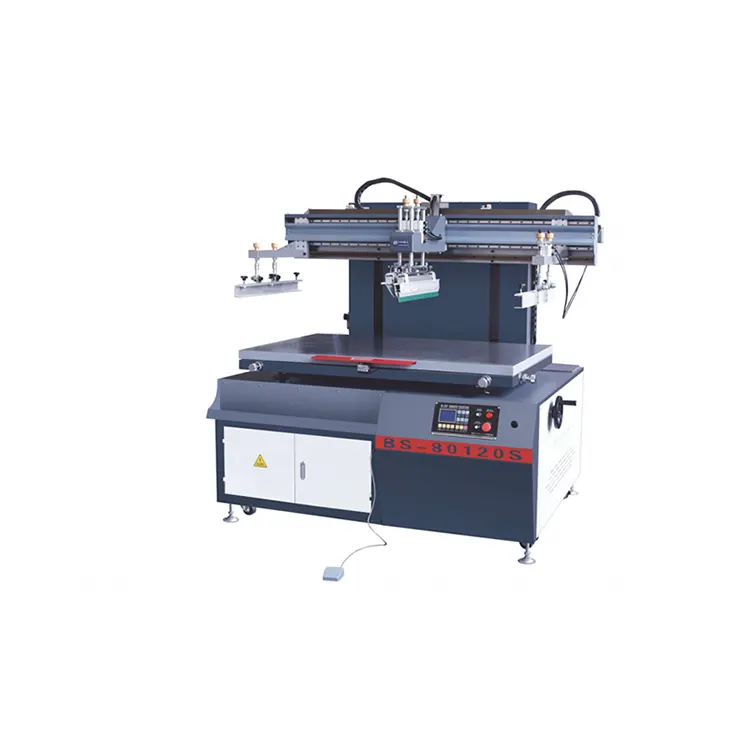
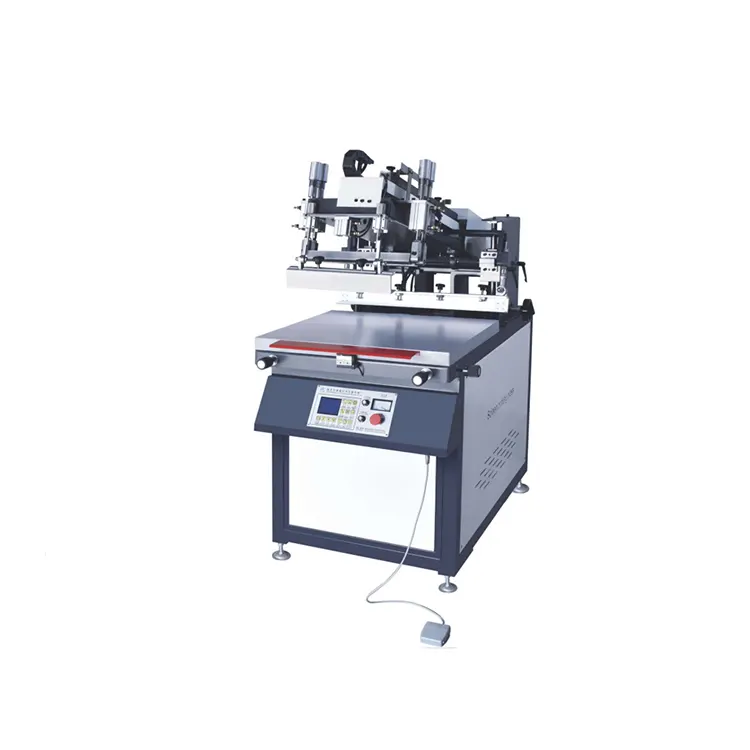
A Microcomputer Controlled Flat Lift Screen Printing Machine combines electronic control and mechanical precision to print graphics, text, and patterns on flat substrates. Its LCD control system, adjustable printing speed, pneumatic scraper mechanism, and vacuum-holding platform help operators manage printing conditions and maintain consistent results. Green Ohm offers the BS-5070S, BS-6090S, and BS-80120S models, with maximum printing areas ranging from 500 × 700 mm to 800 × 1200 mm. These configurations can serve manufacturers working with acrylic, metal sheets, circuit boards, paper, cards, self-adhesive stickers, and other flat materials. Selecting the right model requires evaluating substrate dimensions, expected production volume, screen-frame size, and workshop utilities.
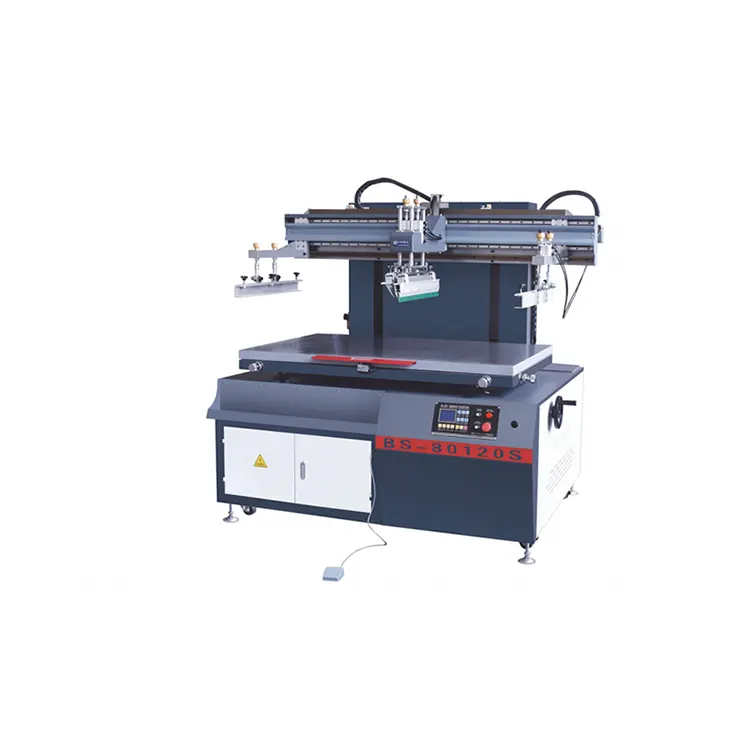
Table of Contents
1. What Is a Microcomputer Controlled Flat Lift Screen Printing Machine?
3. What Features Support Consistent Printing Quality?
4. What Are the Main Technical Specifications?
5. Which Materials and Applications Are Suitable?
6. How Should You Choose the Right Model?
7. How Can Businesses Improve Production Efficiency?
8. What Maintenance Practices Help Maintain Performance?
10. Conclusion: Finding the Right Printing Solution
What Is a Microcomputer Controlled Flat Lift Screen Printing Machine?
A Microcomputer Controlled Flat Lift Screen Printing Machine is a semi-automatic printing system designed to transfer ink through a prepared screen onto flat or relatively rigid materials. It combines a controlled screen-lifting mechanism with a reciprocating printing stroke, helping manufacturers produce repeatable patterns across multiple workpieces.
Unlike basic manual equipment, this machine integrates a microcomputer control system, an LCD display, variable-frequency drive functions, pneumatic blade operation, and a vacuum adsorption platform. These components help operators manage printing movements, adjust working conditions, and position substrates more consistently.
The flat-lift structure is particularly relevant when production involves hard, flat products that require accurate positioning and controlled ink application. Typical applications include advertising panels, acrylic products, metal sheets, electronic components, decorative materials, and printed cards.
As a manufacturer of industrial printing equipment, Green Ohm presents this machine series in three configurations. Each model has different printing dimensions and rated production speeds, allowing buyers to compare equipment against their product requirements rather than relying on a one-size-fits-all solution.
How Does the Machine Work?
The machine coordinates screen movement, ink application, and workpiece positioning to produce a printed image. Understanding the operating sequence helps production teams prepare suitable screens, organize materials, and reduce avoidable setup errors.
- Prepare the screen: Create the required screen stencil according to the artwork, substrate, ink, and printing process.
- Position the workpiece: Place the flat material on the printing platform and use the vacuum adsorption function to hold it securely when appropriate.
- Align the screen: Use the available adjustment mechanism to correct screen positioning and establish the required registration.
- Configure the printing cycle: Set suitable operating conditions and adjust printing movement and blade pressure according to the job requirements.
- Apply the ink: The scraper moves across the screen, forcing ink through the open stencil areas and onto the substrate.
- Inspect the result: Check print clarity, coverage, alignment, and consistency before proceeding with the production batch.
The exact settings depend on the ink formulation, screen mesh, substrate surface, artwork, and desired finish. Trial printing is recommended before a large production run, especially when introducing a new material or changing the printing process.
What Features Support Consistent Printing Quality?
1. Microcomputer Control with LCD Display
The integrated microcomputer control system provides an LCD display and an operation-oriented interface. Operators can manage the machine's working functions more conveniently, supporting consistent setup procedures across repeat jobs. Clear controls can also make routine operation easier to learn, although training remains important for safe and effective use.
2. Variable-Frequency Lifting and Printing Movement
Electric variable-frequency control is used for the lifting mechanism and printing transmission. Adjustable movement helps operators select appropriate operating speeds for different printing tasks. Smooth, repeatable movement is especially valuable when visual consistency matters across a batch of similar products.
3. Pneumatic Scraper and Ink Blade Adjustment
The scraper and ink blade use pneumatic control, with independent pressure adjustment for the blades. This allows operators to adapt the printing process to different screen and ink conditions. The secondary pneumatic blade-lifting function also supports screen plate replacement and tool disassembly, making routine setup more convenient.
4. Vacuum Adsorption Platform
The automatic vacuum adsorption platform helps hold flat workpieces in position during printing. This is useful for lightweight or smooth materials that could shift during a printing stroke. Combined with the screen-alignment adjustment handle, the platform supports more controlled positioning and can help reduce movement-related printing defects.
5. Adjustable Platform and Safety Features
The four-column manual lifting platform allows operators to adjust the platform height and working relationship between the screen and substrate. Green Ohm also describes a platform-area safety mechanism designed to return the platform to its original position when the relevant protection mechanism is activated. Operators should review the supplied operating instructions and verify the installed safety functions before production.
- Microcomputer control with LCD display.
- Variable-frequency lifting and printing transmission.
- Pneumatic scraper and ink blade control.
- Automatic vacuum workpiece adsorption.
- Fine adjustment for screen alignment.
- Platform-height adjustment for setup requirements.
What Are the Main Technical Specifications?
Comparing the technical specifications is an essential step when purchasing a Microcomputer Controlled Flat Lift Screen Printing Machine. The following figures are based on the three models listed by Green Ohm.
| Specification | BS-5070S | BS-6090S | BS-80120S |
|---|---|---|---|
| Maximum Printing Area | 500 × 700 mm | 600 × 900 mm | 800 × 1200 mm |
| Maximum Mesh Frame Area | 750 × 1000 mm | 850 × 1200 mm | 1000 × 1500 mm |
| Minimum Screen Size | 500 × 400 mm | 500 × 400 mm | 500 × 400 mm |
| Printing Platform Size | 600 × 900 mm | 700 × 1100 mm | 900 × 1400 mm |
| Maximum Listed Printing Speed | 1100 prints/hour | 1000 prints/hour | 900 prints/hour |
| Working Air Pressure | 5–8 (unit to be confirmed) | 5–8 (unit to be confirmed) | 5–8 (unit to be confirmed) |
| Power Supply and Rated Power | 380 V / 2.25 kW | 380 V / 2.65 kW | 380 V / 3.7 kW |
| Overall Weight | 520 kg | 560 kg | 600 kg |
| Machine Dimensions (L × W × H) | 1300 × 1080 × 1680 mm | 1500 × 1180 × 1680 mm | 1800 × 1380 × 1680 mm |
Note: The air-pressure figures are reproduced from the manufacturer's published specifications, which list the range as 5–8 without clearly stating the unit. Confirm the required pressure unit, electrical configuration, and installation conditions with the supplier before ordering.
How Should You Interpret the Specifications?
- Printing area: Check the actual artwork dimensions and allow for the margins needed for screen positioning and production setup.
- Mesh frame area: Confirm that your existing or planned screen frames fit the machine's permitted dimensions.
- Printing speed: Treat the listed figure as a maximum reference, not a guaranteed finished-output rate for every job.
- Platform dimensions: Check workpiece size, fixture requirements, and the space needed for operator access.
- Power and air supply: Verify workshop compatibility before arranging installation.
For additional information about the product configuration, consult the official Microcomputer Controlled Flat Lift Screen Printing Machine product page.
Which Materials and Applications Are Suitable?
Flat screen printing is used in industries where graphics, labels, patterns, or functional ink layers must be applied to flat surfaces. The machine's listed applications cover a broad range of rigid and flat products, although the final suitability of each job depends on material properties and process settings.
| Material or Product | Potential Application | Key Consideration |
|---|---|---|
| Paper and cards | Printed graphics, product cards, promotional materials | Ink absorption and paper stability |
| Acrylic and organic glass | Signs, decorative panels, product markings | Surface cleanliness and ink adhesion |
| Metal sheets | Panel graphics, labels, industrial markings | Surface preparation and compatible ink |
| Printed circuit boards | Selected screen-printing processes for electronics | Registration accuracy and process compatibility |
| Film switches | Graphic overlays and membrane switch layers | Layer alignment and controlled ink application |
| Self-adhesive stickers | Decorative labels and product graphics | Adhesive backing, substrate handling, and curing |
| Ceramic decorative paper | Decorative patterns and transferred designs | Ink or paste compatibility with the intended process |
| Wooden boxes | Branding, decorative graphics, and product identification | Surface flatness and porosity |
Before committing to production, test the intended substrate with the selected ink, screen, and curing method. These checks help confirm adhesion, color coverage, registration, and final appearance. For materials with uneven surfaces or unusual thicknesses, consult the supplier about practical setup limits.
How Should You Choose the Right Model?
The most suitable machine is not necessarily the largest or fastest one. A practical selection should balance product dimensions, batch size, available workshop space, and the technical demands of the printing process.
Choose BS-5070S for Smaller Printing Areas
The BS-5070S has a maximum printing area of 500 × 700 mm and a listed maximum speed of 1100 prints per hour. It may be worth evaluating when your products fit the smaller format and your workflow prioritizes a higher stated cycle rate.
Choose BS-6090S for a Mid-Range Format
The BS-6090S supports a maximum printing area of 600 × 900 mm and a listed maximum speed of 1000 prints per hour. It offers a larger printing area than the BS-5070S while maintaining a different balance between workpiece capacity and rated speed.
Choose BS-80120S for Larger Flat Products
The BS-80120S provides a maximum printing area of 800 × 1200 mm and a maximum mesh frame area of 1000 × 1500 mm. It is the model to investigate when larger panels or substrates exceed the working area of the smaller configurations.
Purchasing Checklist
- Measure the largest workpiece and the actual printable area.
- Confirm screen-frame dimensions and alignment requirements.
- Identify the substrate material, ink type, and required finish.
- Estimate realistic production output, including loading, unloading, inspection, and curing.
- Check available electrical power, compressed air, floor space, and operator access.
- Ask for sample-printing guidance and confirm the details of installation and operator training.
- Request a written quotation that specifies the model, included equipment, delivery terms, and after-sales support.
How Can Businesses Improve Production Efficiency?
Equipment performance is only one part of an efficient printing operation. Work preparation, material handling, setup discipline, and quality checks also influence how many acceptable products a production line can deliver.
Standardize Setup Procedures
Document screen alignment, blade pressure settings, ink preparation, and substrate positioning for repeat jobs. A repeatable setup process reduces unnecessary adjustment and helps operators identify deviations earlier.
Organize Material Handling
Arrange incoming substrates and finished products so operators can load and unload them without interrupting the printing cycle more than necessary. Use appropriate fixtures and handling procedures for delicate or easily scratched materials.
Monitor First-Article Quality
Inspect initial samples before continuing with a full batch. Check print position, color consistency, coverage, adhesion, and any job-specific acceptance criteria. Early inspection can reduce the cost of discovering defects after many products have been printed.
Measure Actual Production Output
The listed maximum speed is useful for initial comparison, but real production output also depends on loading time, screen preparation, substrate characteristics, inspection, and downstream drying or curing. Record actual good units per hour to establish realistic capacity and identify bottlenecks.
For manufacturers expanding an existing line, compare the machine's operating cycle with the capacity of upstream material preparation and downstream finishing equipment. A balanced workflow often matters more than the speed of an individual machine.
What Maintenance Practices Help Maintain Performance?
Routine maintenance helps preserve printing consistency, reduce avoidable downtime, and support safe operation. Follow the machine's supplied maintenance schedule and manufacturer instructions rather than relying on a generic checklist alone.
- Clean the printing area: Remove ink residue and debris using cleaning products compatible with the screen, machine components, and ink system.
- Inspect the scraper and ink blade: Check for wear, damage, contamination, or uneven edges that could affect ink transfer.
- Check the vacuum platform: Keep the holding surface and vacuum openings clear, and investigate any loss of holding performance.
- Inspect moving components: Monitor guide rails, lifting mechanisms, fasteners, and transmission components according to the manufacturer's maintenance instructions.
- Review pneumatic connections: Check for leaks or irregular operation and maintain the air supply within the confirmed operating range.
- Verify alignment: Recheck screen positioning after setup changes, maintenance, or a change in product dimensions.
- Follow safety procedures: Isolate power and stored pneumatic energy as required before maintenance, and never bypass safety devices.
Keep a record of cleaning, adjustments, component replacement, and recurring print defects. These records help maintenance teams identify patterns and plan service before minor problems disrupt production.
Frequently Asked Questions
1. What is a Microcomputer Controlled Flat Lift Screen Printing Machine used for?
It is designed for semi-automatic screen printing on flat materials such as paper, acrylic, metal sheets, circuit boards, film switches, self-adhesive stickers, cards, and wooden boxes. Actual suitability depends on the substrate, ink, screen, and required printing process.
2. What is the maximum printing speed?
Green Ohm lists maximum speeds of 1100 prints per hour for the BS-5070S, 1000 prints per hour for the BS-6090S, and 900 prints per hour for the BS-80120S. Actual output varies with setup, material handling, printing conditions, and inspection requirements.
3. Is this machine fully automatic?
No. The listed flat-lift series is semi-automatic. It combines microcomputer controls, variable-frequency movement, pneumatic blade functions, and vacuum adsorption, while operators remain involved in workpiece handling and production setup.
4. Which model offers the largest printing area?
The BS-80120S offers the largest listed printing area at 800 × 1200 mm, with a maximum mesh frame area of 1000 × 1500 mm. Confirm your full workpiece and screen dimensions before selecting the model.
5. What power supply does the machine require?
The published specifications list a 380 V supply. The rated power is 2.25 kW for the BS-5070S, 2.65 kW for the BS-6090S, and 3.7 kW for the BS-80120S. Confirm the precise electrical configuration and site requirements with Green Ohm before installation.
6. How does the vacuum platform help improve printing consistency?
The vacuum platform helps hold the workpiece in position during the printing stroke. Reducing substrate movement can support more consistent registration, particularly when printing on suitable flat materials.
7. What should buyers confirm before placing an order?
Buyers should confirm the printable area, mesh frame dimensions, actual production requirements, compatible materials, electrical supply, working air pressure and its unit, delivery scope, installation arrangements, and after-sales support. Sample testing is advisable when print quality depends on specific ink and substrate combinations.
Conclusion: Finding the Right Printing Solution
A Microcomputer Controlled Flat Lift Screen Printing Machine can be a practical option for manufacturers that need repeatable flat-surface printing, adjustable operating conditions, and support for different rigid materials. Its microcomputer control, variable-frequency transmission, pneumatic blade adjustment, and vacuum adsorption platform help operators manage key parts of the printing process.
Green Ohm's BS-5070S, BS-6090S, and BS-80120S models offer different printing areas and rated speeds for a range of production requirements. By evaluating product dimensions, material compatibility, realistic output, workshop utilities, and maintenance needs, buyers can make a more informed equipment decision.
If you are comparing printing machine configurations or planning to improve your production workflow, explore the Microcomputer Controlled Flat Lift Screen Printing Machine from Green Ohm. Contact us today to discuss your substrate, printing area, production targets, and technical requirements, and request guidance on selecting a suitable model for your business.
Related News
- How Can an Electronic Shaft Rotogravure Printing Machine Improve Printing Accuracy and Flexible Packaging Efficiency
- How Can an Eco-Friendly Solvent Less Lamination Machine Transform Flexible Packaging Production
- How Can a Microcomputer Controlled Flat Lift Screen Printing Machine Improve Modern Industrial Printing Efficiency
- How Can a Microcomputer Controlled Swing Arm Screen Printing Machine Improve Modern Printing Efficiency
- How Can a Microcomputer Controlled Flat Lift Screen Printing Machine Transform Modern Industrial Printing Efficiency
- How Does Solvent-base Lamination Improve Flexible Packaging Quality?
Leave me a message