
How Can a Microcomputer Controlled Flat Diagonal Arm Screen Printing Machine Improve Printing Accuracy and Production Efficiency
Article Summary: A microcomputer controlled flat diagonal arm screen printing machine helps manufacturers achieve consistent printing quality, flexible substrate handling, and efficient production. Green Ohm provides this semi-automatic printing solution with LCD-based control, variable-frequency drive technology, pneumatic blade adjustment, vacuum adsorption, and integrated safety protection. This article explores its working principles, key features, technical specifications, material compatibility, and selection criteria to help printing businesses make informed equipment investment decisions.
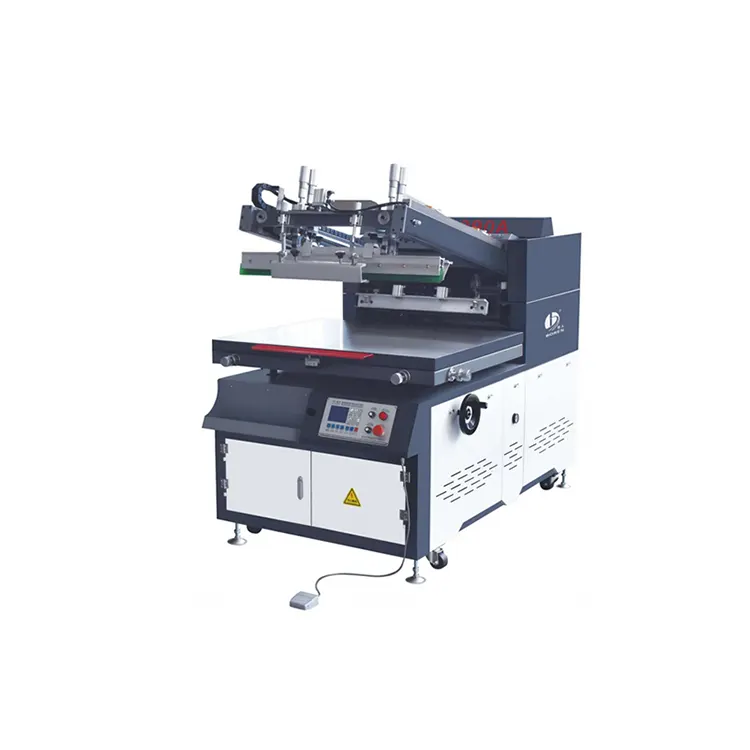
Table of Contents
- What Is a Microcomputer Controlled Flat Diagonal Arm Screen Printing Machine?
- How Does the Machine Work?
- What Are the Main Features and Benefits?
- Technical Specifications and Model Comparison
- Which Materials and Products Can It Print?
- How to Choose the Right Configuration
- Maintenance Practices for Reliable Operation
- Frequently Asked Questions
- Conclusion: A Practical Solution for Industrial Screen Printing
What Is a Microcomputer Controlled Flat Diagonal Arm Screen Printing Machine?
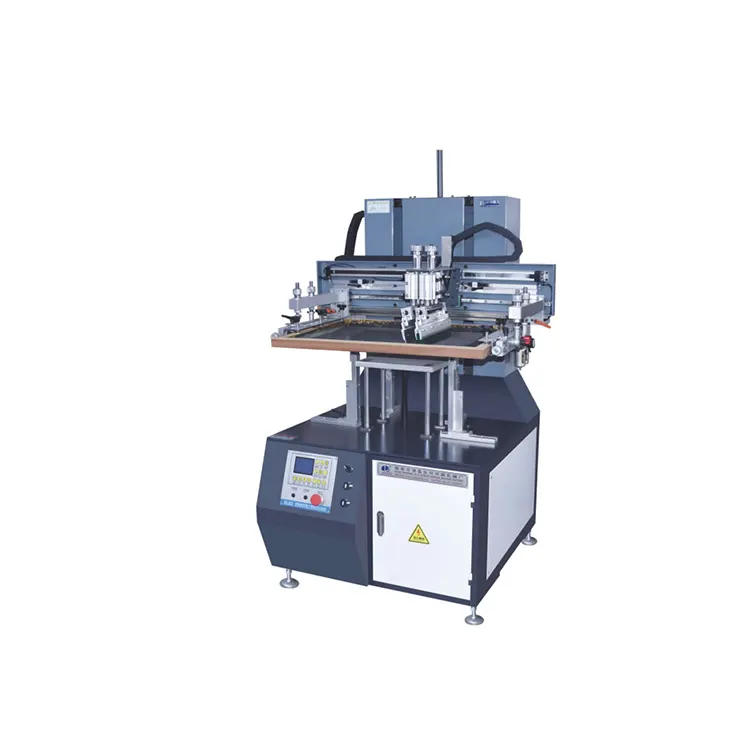
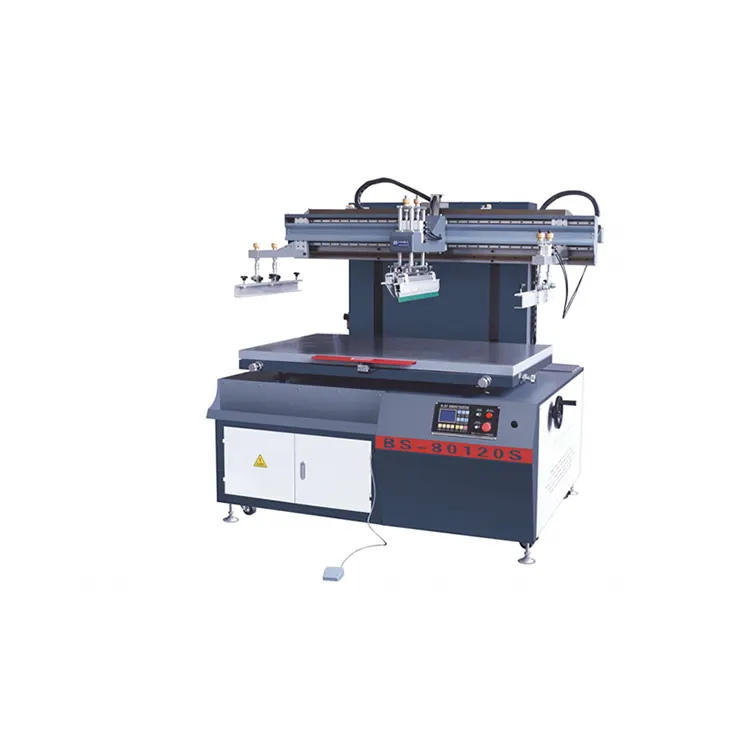
A Microcomputer Controlled Flat Diagonal Arm Screen Printing Machine is a semi-automatic printing system designed to transfer ink, coatings, or functional printing materials onto flat substrates. Green Ohm develops this equipment for manufacturers that need dependable printing performance, convenient operation, and flexibility across different industrial applications.
Unlike conventional manual screen printing equipment, this machine integrates electronic controls, mechanically coordinated screen movement, adjustable printing transmission, and pneumatic blade operation. Its inclined screen-lifting arm structure supports a controlled printing cycle, while the vacuum platform helps keep the workpiece securely positioned during production.
The machine is particularly useful when manufacturers need to print graphics, product information, decorative patterns, labels, or specialized surface effects on flat materials. By combining mechanical stability with adjustable operating parameters, it can help businesses establish a more repeatable printing process and reduce inconsistencies caused by uncontrolled manual operations.
For companies comparing industrial printing solutions, it is helpful to evaluate the machine alongside other flat screen printing machines to determine which operating structure best matches their products and production requirements.
How Does the Machine Work?
The machine coordinates screen movement, substrate positioning, blade pressure, and ink transfer to produce printed patterns on flat surfaces. Its microcomputer control system simplifies operation, while adjustable mechanical and pneumatic components help operators adapt the process to different printing jobs.
A typical production cycle involves the following steps:
- Prepare the substrate: Clean the material surface and confirm that its dimensions and characteristics are suitable for the selected printing process.
- Position the workpiece: Place the substrate on the printing platform and activate vacuum adsorption where appropriate to minimize movement.
- Align the screen: Install the prepared screen frame and use the adjustment mechanism to correct registration and positioning.
- Set printing parameters: Configure the operating cycle and adjust printing speed, lifting movement, and blade pressure according to the material and ink requirements.
- Execute the printing stroke: The printing blade moves across the screen to transfer ink through the mesh onto the substrate.
- Return the ink and inspect: The machine completes its programmed movement, and the operator checks the printed result before continuing production.
Actual operating procedures depend on the selected configuration, screen design, ink characteristics, and workpiece requirements. Proper setup and process testing remain essential for achieving consistent output.
What Are the Main Features and Benefits?
1. Microcomputer Control with LCD Display
The integrated microcomputer control system provides an LCD display and an accessible operating interface. Operators can monitor and manage key machine functions more conveniently than with a purely manual arrangement. This design can simplify routine operation, particularly when production involves repeated printing cycles.
2. Variable-Frequency Speed Adjustment
Electric variable-frequency control is used for the lifting mechanism and printing transmission. Adjustable movement helps operators match machine operation to substrate characteristics, ink behavior, and the required finish. Controlled motion can also support more stable production when changing between suitable printing jobs.
3. Pneumatic Scraper and Ink Blade Control
The scraper and ink-return blade use pneumatic control, with independently adjustable pressure. This arrangement allows operators to fine-tune blade performance according to printing requirements. Appropriate pressure settings are important for achieving uniform ink transfer while avoiding unnecessary stress on the screen or substrate.
4. Vacuum Adsorption and Registration Adjustment
The automatic vacuum platform holds compatible flat workpieces in position during printing. A fine-adjustment handle helps operators correct screen alignment, while the lifting platform supports adjustment of the distance between the screen and substrate. These features are valuable when consistent placement and repeatable image registration matter.
5. Integrated Safety Protection
The machine incorporates a safety protection arrangement designed to help the platform return to its original position when the relevant braking or safety mechanism is activated. Operators should follow the manufacturer's instructions, keep protective mechanisms functional, and complete the required safety checks before production.
Together, these features provide a practical balance of control, adjustability, and ease of use. Actual productivity and print quality will depend on the application, operating conditions, consumables, and operator training.
Technical Specifications and Model Comparison
Green Ohm publishes two configurations for its microcomputer controlled flat diagonal arm screen printing machine: BS-6090A and BS-80120A. Comparing their working areas, platform dimensions, speed ratings, and utility requirements can help buyers identify a suitable starting point for equipment selection.
| Specification | BS-6090A | BS-80120A |
|---|---|---|
| Maximum Printing Area | 600 × 900 mm | 800 × 1200 mm |
| Maximum Mesh Frame Area | 950 × 1150 mm | 1150 × 1450 mm |
| Minimum Screen Size | 700 × 400 mm | 800 × 400 mm |
| Printing Platform Size | 800 × 1000 mm | 1000 × 1300 mm |
| Maximum Listed Printing Speed | 1,200 prints/hour | 1,100 prints/hour |
| Working Air Pressure | 5–8 | 5–8 |
| Power Supply and Rated Power | 380 V / 2.05 kW | 380 V / 3.35 kW |
| Overall Weight | 520 kg | 600 kg |
| Machine Dimensions | 1700 × 1080 × 1300 mm | 1900 × 1380 × 1300 mm |
Source: Green Ohm's published product specifications. Confirm the final machine configuration, electrical requirements, and utility details with the manufacturer before ordering. The published air-pressure figures are listed as 5–8; the pressure unit should be confirmed with the supplier. Maximum printing speeds are equipment ratings, not guaranteed production output.
The BS-6090A may be a practical option for businesses printing products that fit within a 600 × 900 mm maximum printing area. The BS-80120A provides a larger 800 × 1200 mm printing area for larger workpieces. However, the best choice depends on the actual printable dimensions, screen-frame requirements, substrate handling method, and available workshop space.
Which Materials and Products Can It Print?
The machine is designed for a variety of flat substrates and specialized printing applications. Material compatibility depends on surface treatment, ink formulation, adhesion requirements, workpiece thickness, and the selected printing process.
- Plastic and synthetic materials: Suitable plastic sheets and compatible flat plastic products used in industrial or promotional applications.
- Leather and non-woven materials: Selected leather surfaces and non-woven fabric bags, subject to substrate and ink compatibility.
- Labels and stickers: Self-adhesive stickers and related flat-format printing products.
- Electronic components: Suitable film switches and other compatible flat components requiring controlled graphic or functional printing.
- Decorative products: Decorative paper for process ceramics, gift boxes, wine boxes, calendars, and other suitable flat products.
- Special surface effects: Applications involving compatible UV coatings, frosting, wrinkle effects, creases, and adhesive or scraping processes.
- Cards and printed materials: Cards, selected book-related products, and other flat substrates that meet the machine's working-area requirements.
Before full production, manufacturers should test ink adhesion, drying or curing behavior, surface cleanliness, print resolution, and resistance to the intended use conditions. For heat-sensitive or uneven materials, additional process validation may be necessary.
Businesses working with multiple product types can also explore Green Ohm's flat screen printing equipment range to compare alternative machine structures and identify a solution suited to their production workflow.
How to Choose the Right Configuration
Choosing a microcomputer controlled flat diagonal arm screen printing machine should begin with a clear understanding of the product, production target, and operating environment. A machine with a larger working area is not automatically the most economical choice if most jobs involve smaller substrates.
Use the following checklist when evaluating a potential purchase:
- Measure the printable area: Consider the complete artwork dimensions, workpiece margins, positioning requirements, and screen-frame size.
- Estimate actual production demand: Calculate required daily output and account for loading, unloading, setup, inspection, and material changes.
- Verify substrate compatibility: Confirm that the platform and printing process can accommodate the material's dimensions, thickness, weight, and surface characteristics.
- Review adjustment requirements: Determine whether variable-frequency control, vacuum adsorption, and independent blade-pressure adjustment suit the application.
- Check workshop utilities: Confirm the electrical supply, air supply, installation footprint, machine weight, and access for delivery and maintenance.
- Request a sample test: Where possible, provide representative substrates and artwork so the printing result can be evaluated before finalizing the specification.
- Clarify technical support: Discuss installation guidance, operator training, spare parts, warranty coverage, and after-sales service arrangements.
A well-matched machine should support the required print quality and production volume without introducing unnecessary equipment costs or operational complexity. Buyers should assess the complete printing process rather than relying on maximum speed alone.
Maintenance Practices for Reliable Operation
Regular maintenance helps preserve mechanical stability, printing consistency, and equipment service life. Although maintenance intervals vary with production intensity and working conditions, a structured inspection routine can help identify issues before they disrupt production.
- Clean the screen and blades: Remove ink residues using cleaning materials compatible with the screen, blade, and ink system.
- Inspect pneumatic components: Check air lines, connections, and blade operation for leaks, inconsistent movement, or abnormal pressure changes.
- Check the vacuum platform: Keep the adsorption surface and relevant passages clean to maintain secure workpiece positioning.
- Monitor mechanical movement: Look for unusual noise, vibration, looseness, or inconsistent lifting and printing strokes.
- Verify alignment: Check screen registration and platform settings when changing jobs or when print quality begins to vary.
- Maintain safety systems: Inspect safety controls and braking mechanisms according to the manufacturer's instructions. Isolate power and air supplies before performing maintenance where required.
- Keep operating records: Record cleaning, adjustments, component replacements, and recurring print defects to support preventive maintenance.
Operators should follow the official operation manual and use approved replacement components. Routine care, correct setup, and timely technical support can help reduce avoidable downtime and maintain repeatable printing performance.
Frequently Asked Questions
1. Is the Microcomputer Controlled Flat Diagonal Arm Screen Printing Machine fully automatic?
No. Green Ohm describes this equipment as a semi-automatic screen printing machine. It combines microcomputer control and powered printing functions with operator involvement in tasks such as workpiece handling, setup, and quality inspection.
2. What is the maximum printing area?
The BS-6090A has a maximum printing area of 600 × 900 mm, while the BS-80120A supports up to 800 × 1200 mm. Select a model according to the dimensions of the actual printable area rather than the overall workpiece size alone.
3. What is the maximum printing speed?
The published maximum speeds are 1,200 prints per hour for the BS-6090A and 1,100 prints per hour for the BS-80120A. Actual output depends on material loading, printing conditions, artwork requirements, and production workflow.
4. Which materials can the machine handle?
Applications include compatible plastic and leather materials, non-woven fabric bags, film switches, stickers, decorative paper, cards, gift boxes, and other suitable flat substrates. Buyers should verify adhesion, surface compatibility, and workpiece dimensions before production.
5. Why is vacuum adsorption important?
Vacuum adsorption helps hold compatible workpieces firmly on the printing platform. This reduces unwanted movement during printing and can support more consistent positioning and registration.
6. What should buyers confirm before placing an order?
Confirm the printing area, mesh-frame dimensions, rated speed, electrical configuration, working air-pressure requirements, machine footprint, substrate compatibility, installation conditions, and after-sales support. A sample printing test can help verify whether the proposed configuration meets the required quality standards.
7. How can manufacturers improve printing consistency?
Use properly prepared screens, compatible inks, clean substrates, stable vacuum adsorption, and suitable blade-pressure and speed settings. Regular equipment inspection and documented operating procedures also help reduce variation between printing cycles.
Conclusion: A Practical Solution for Industrial Screen Printing
A Microcomputer Controlled Flat Diagonal Arm Screen Printing Machine can help manufacturers improve process control, simplify routine operation, and produce consistent prints across a range of compatible flat substrates. With LCD-based microcomputer control, variable-frequency movement, pneumatic blade adjustment, vacuum adsorption, and integrated safety features, Green Ohm's BS-6090A and BS-80120A offer two configurations for different printing-area requirements.
The right investment depends on the dimensions of the product, required print quality, expected production volume, material characteristics, and available factory utilities. By comparing technical specifications and validating the printing process before purchase, manufacturers can make a more informed equipment decision and establish a dependable production workflow.
If you are looking for a suitable flat screen printing solution for industrial products, packaging materials, labels, decorative applications, or other flat substrates, explore the Microcomputer Controlled Flat Diagonal Arm Screen Printing Machine from Green Ohm. Contact us today to discuss your printing requirements, confirm the appropriate model, and request detailed technical information for your application.
Related News
- How Can a Fully Automatic Carton Screen Printing Machine Improve Packaging Quality and Production Efficiency
- How Can an Electronic Shaft Rotogravure Printing Machine Improve Printing Accuracy and Flexible Packaging Efficiency
- How Can a Microcomputer Controlled Flat Lift Screen Printing Machine Improve Printing Accuracy and Production Efficiency
- How Can an Eco-Friendly Solvent Less Lamination Machine Transform Flexible Packaging Production
- How Can a Microcomputer Controlled Flat Lift Screen Printing Machine Improve Modern Industrial Printing Efficiency
- How Can a Microcomputer Controlled Swing Arm Screen Printing Machine Improve Modern Printing Efficiency
Leave me a message